
Boost meeting notes accuracy with your custom vocabularies.
August 25, 2025Ever had your meeting software mishear project codes, internal jargon, or industry terms?
We get it. AI often stumbles on the words that matter most.
That is why we are excited to launch Custom Vocabulary 🎉
Upload the names, acronyms, and specialized terms you use every day, and Meeting Ink will deliver transcripts and summaries that stay true to your conversations and your industry.
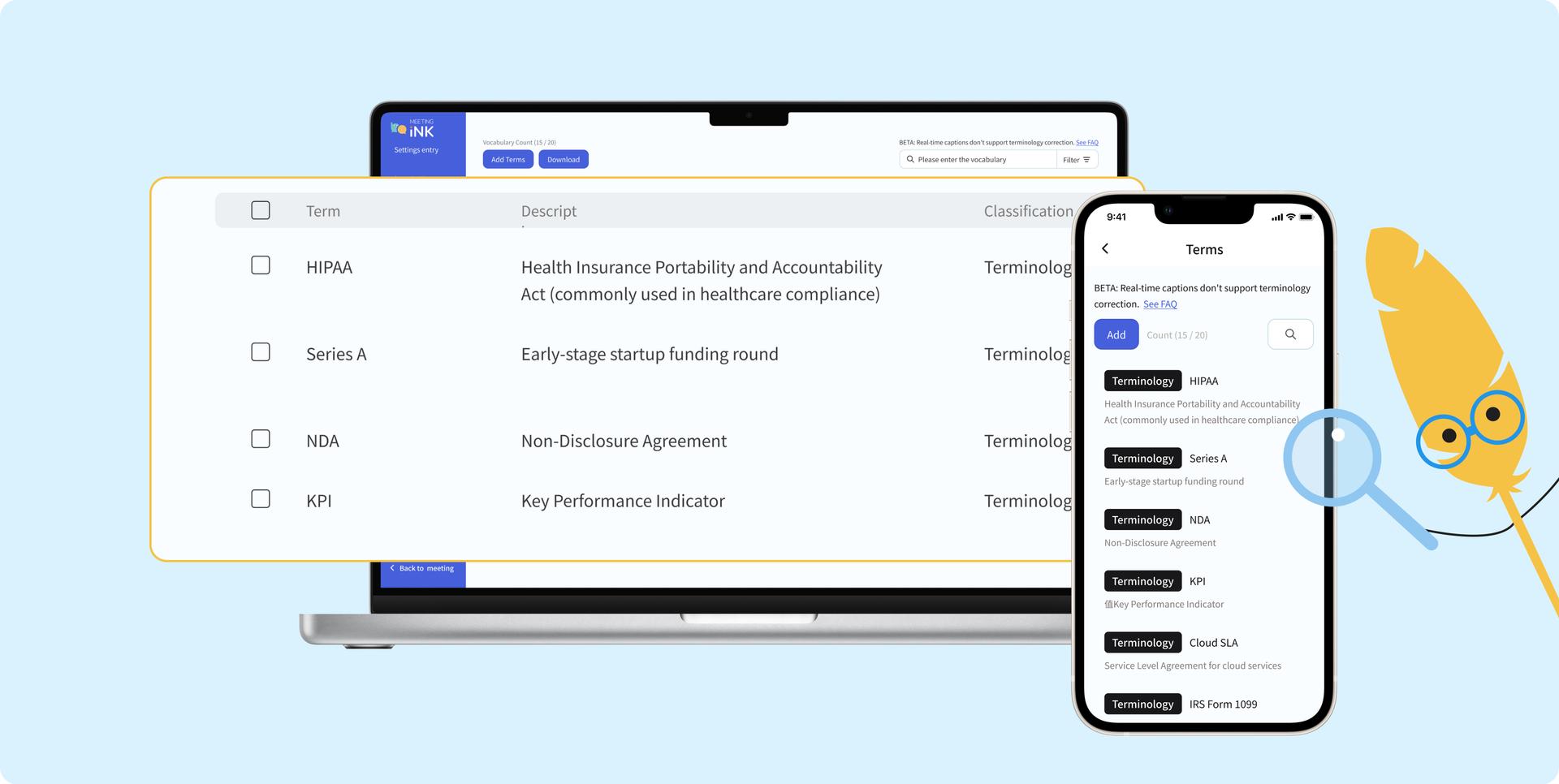
Custom Vocabulary: Smarter, More Accurate Meeting Notes
Meeting Ink is already among the most accurate multilingual AI note-taking tools on the market. But every industry has unique vocabulary—project codes, technical names, equipment references, acronyms, people, or organizations—that can trip up transcription. The result is typos, mistranslations, or summaries that miss the real point.
Now you can upload your own Custom Vocabulary List, so Meeting Ink understands the specialized words and context you use. This makes transcripts cleaner and summaries sharper, perfectly aligned with your conversations.
Here are a few examples of how different professionals can benefit:
- Structural engineers: “support piles”, “backfill sand”, “reinforced concrete”
- Legal teams: “Article 184 of the Civil Code”, “out of court settlement”, “real contract”
- Healthcare professionals: “CXR”, “DVT”, “anticoagulant”, “lab report items”
- Venture capital firms: “SAFE”, “pre money”, “IRR”, “tokenomics”
- Shipping companies: “bill of lading number”, “AMS”, “CIF”
You can also add customer company names, manager names, product brands, or any other words that matter to your meetings.
Get Started with Custom Vocabulary
➤ For both individual and enterprise users:
Create your own vocabulary in the Meeting Ink Web App or Mobile App by going to Settings → Custom Vocabulary. From there you can add or edit entries anytime.
Each vocabulary entry includes:
- Vocabulary (required): The specific word or phrase that Meeting Ink will recognize in your meetings.
- Description (optional): A short explanation that helps AI generate more accurate summaries.
- Category (optional): Label the word as “jargon”, “person name”, “company name”, or “product name”.
➤ For Enterprise Admin: Build a Shared Vocabulary for Your Organization
Every company has their own unique vocabularies such as industry terms, client names, product model codes, and more. We know your team often refers to these in meetings, and now Meeting Ink makes it easier to capture them accurately.
Enterprise admins can create a Shared Vocabulary List that applies across all Meeting Ink transcripts generated by team members in your organization.
In the Meeting Ink Web, go to Settings → Custom Vocabulary. As an admin, you can add words one by one or bulk upload using a .csv file.
Upload your Custom Vocabulary now. Enhance the meeting note accuracy!
👉 Click here to create your custom vocabulary
Custom Vocabulary Limits
➤ Individual Plans
Your limit depends on your current Meeting Ink plan:
- Basic (Free): up to 3 vocabularies
- Pro: up to 5 vocabularies
- Pro+: up to 20 vocabularies
- Team: up to 20 vocabularies
➤ Enterprise Members
Please contact the Business Development Manager of Meetging Ink Team.
Data Security
Your data is always safe with Meeting Ink.
- Individual Users: Your vocabulary only applies to your own meetings. It is never shared or exposed to other users.
- Enterprise Members: Vocabulary is limited to the member’s own meetings.
- Enterprise Admins: Shared vocabulary is only applied within your company’s workspace and never mixed with data from other Meeting Ink customers.
All data is hosted on Microsoft Azure and fully compliant with ISO 27001 and other international security standards, ensuring your information is protected at the highest level.
Frequently Asked Questions
Q: If I delete a vocabulary entry, will my limit be released?
A: Yes. For example, if you are on the Basic plan, you can upload 3 vocabularies. If you already created 3 but delete 1, you can add 1 new vocabulary.
Q: Which version of the Meeting Ink mobile App supports Custom Vocabulary?
A: Please update your Meeting Ink iOS or Android app to v1.0.19 or later versions to use the feature Custom Vocabulary.
Q: Will my uploaded vocabulary apply to real-time captions during meetings?
A: Not yet. Currently, Custom Vocabulary is not supported in real-time captions. If we add this in the future, the Meeting Ink team will notify all users.
Q: I am on an individual plan and already reached my vocabulary limit. How can I add more?
A: You can review your list and delete less frequently used vocabularies to free up the space. Or you can upgrade to higher level of paid plans to be granted with more quota of custom vocabulary. Check out our pricing page for more information: https://ink.dwave.cc/en-US/pricing
Q: I am an enterprise user and our company needs a larger vocabulary limit. What should we do?
A: Your company can purchase the Custom Vocabulary Expansion Module to increase the upload limit. Please contact us at
Upload your Custom Vocabulary now. Enhance the meeting note accuracy!
We are constantly improving Meeting Ink and building new features to help you run meetings more efficiently. Stay tuned for what’s next!
If you have any suggestions or feedback, feel free to reach out to our support team anytime:
- Email: service@dwave.cc
- Facebook Messenger: Click here


Try Meeting Ink for Free
Experience all core features of Meeting Ink to make your meetings more efficient!
Read More

Your Face Is the Password Now: Passkey Sign-In Comes to Meeting Ink

Paste a YouTube / Apple Podcast Link to Instantly Transcribe: Take Notes, Write Articles, and Organize Key Points All in One Place
Meeting Ink Desktop Release Note