
2025 Meeting Ink: Live Captions & Auto Translation for Online Meetings | Managing Global Teams with Ease
June 17, 2025Attending online meetings on platforms like Google Meet, Teams, or Zoom can be challenging - fast-paced conversations, diverse accents, and limited built-in captions often make it easy to miss key points. For global teams, simple audio transcription software is no longer enough. Modern meetings rely on AI-powered meeting assistants that offer live captions and real-time speech translation, capturing discussions accurately across languages and helping everyone stay on the same page.
With these advanced features, teams can follow conversations seamlessly, reduce misunderstandings, and ensure every participant stays aligned. This not only improves comprehension and collaboration but also makes meetings far more efficient and actionable, empowering international collaboration.
How Subtitles Improve Online Meetings: Live Captions, Translation, and AI Notes
In online meetings that involve multiple languages and departments, traditional note-taking and manual transcription often struggle to balance completeness with efficiency. Today’s meetings demand more: real-time translation and subtitle transcription features have become essential tools for enterprises, government agencies, and consulting teams.
Meeting Ink’s AI-powered real-time subtitle function directly addresses these communication challenges. Its interface is intuitive and web-based, meaning there’s no need to install additional software on your computer.
Key features include:
- Real-time speech-to-text support for multiple languages, including Chinese, English, and Japanese
- Real-time subtitle translation, displaying bilingual captions during meetings
- A web-based interface compatible with Google Meet, Teams, Zoom, and other major platforms
- Three subtitle display modes: full-screen (theater) mode, subtitle-only mode, and standard verbatim transcript
- Automatic speaker recognition and AI-generated post-meeting summaries that highlight key points
How to Enable Real-Time Subtitles and Translation
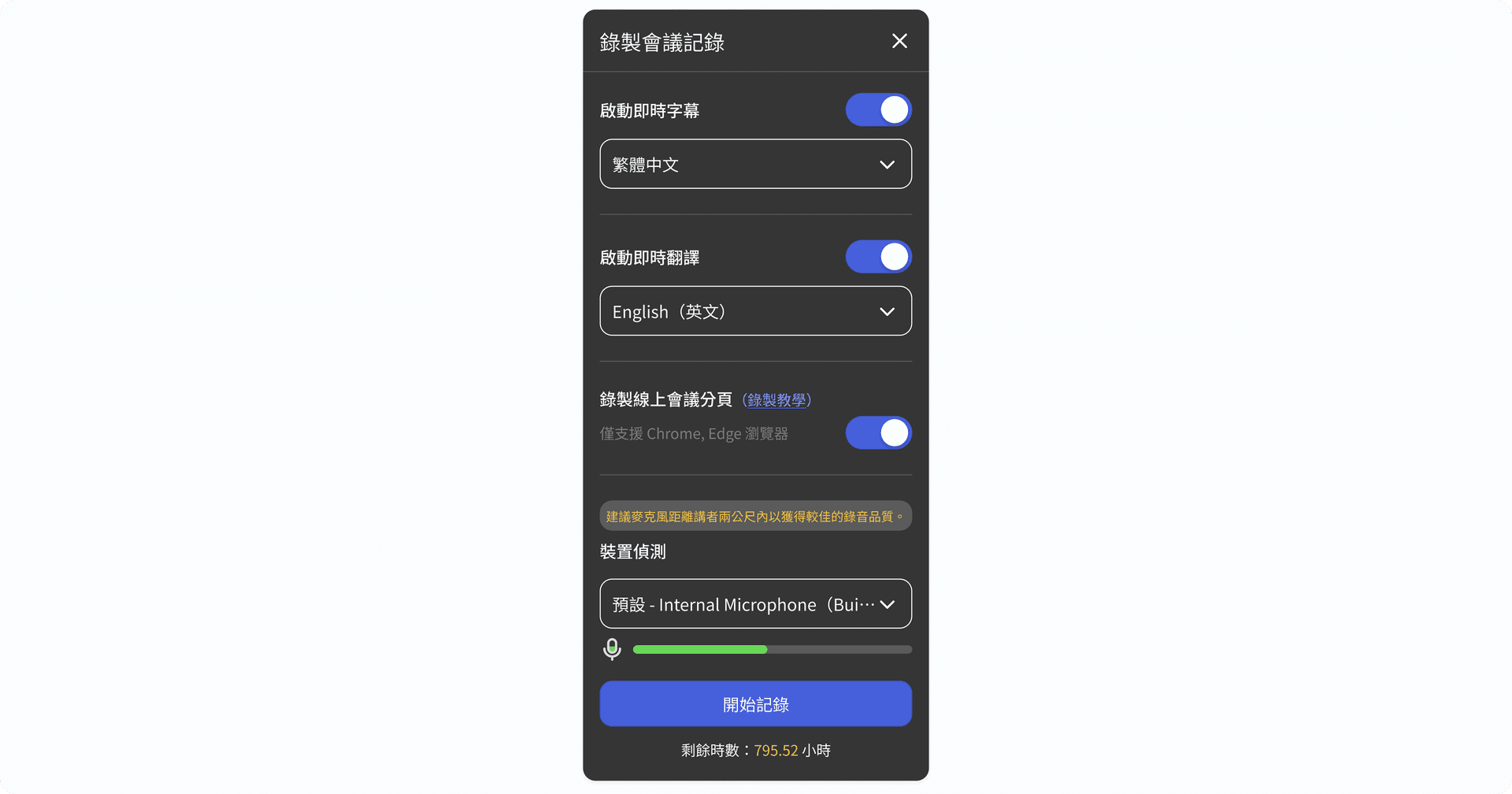
Step 1: Set Up Subtitles and Translation
- Enable real-time subtitles
Start by recording your meeting and turning on real-time subtitles. Then select the meeting language, such as Chinese, English, or Japanese. The system will instantly convert speech into text as the meeting progresses. - Enable real-time translation
If your meeting involves multiple languages, you can display translated subtitles at the same time—for example, converting Chinese speech into English subtitles. Simply activate the real-time translation feature and choose the output languages you need. - Select your audio input device
Make sure to choose the correct microphone or audio input source. Check the audio track under “device detection” to confirm it’s picking up sound properly, avoiding silent recordings. - Record the online meeting tab
For platforms like Google Meet, Microsoft Teams, or Webex, enable browser tab audio recording. This allows the system to capture and transcribe the meeting in real time.
Step 2: Choose the Subtitle Display Mode
Meeting Ink offers three real-time subtitle modes to suit different meeting needs, and you can switch between them at any time.
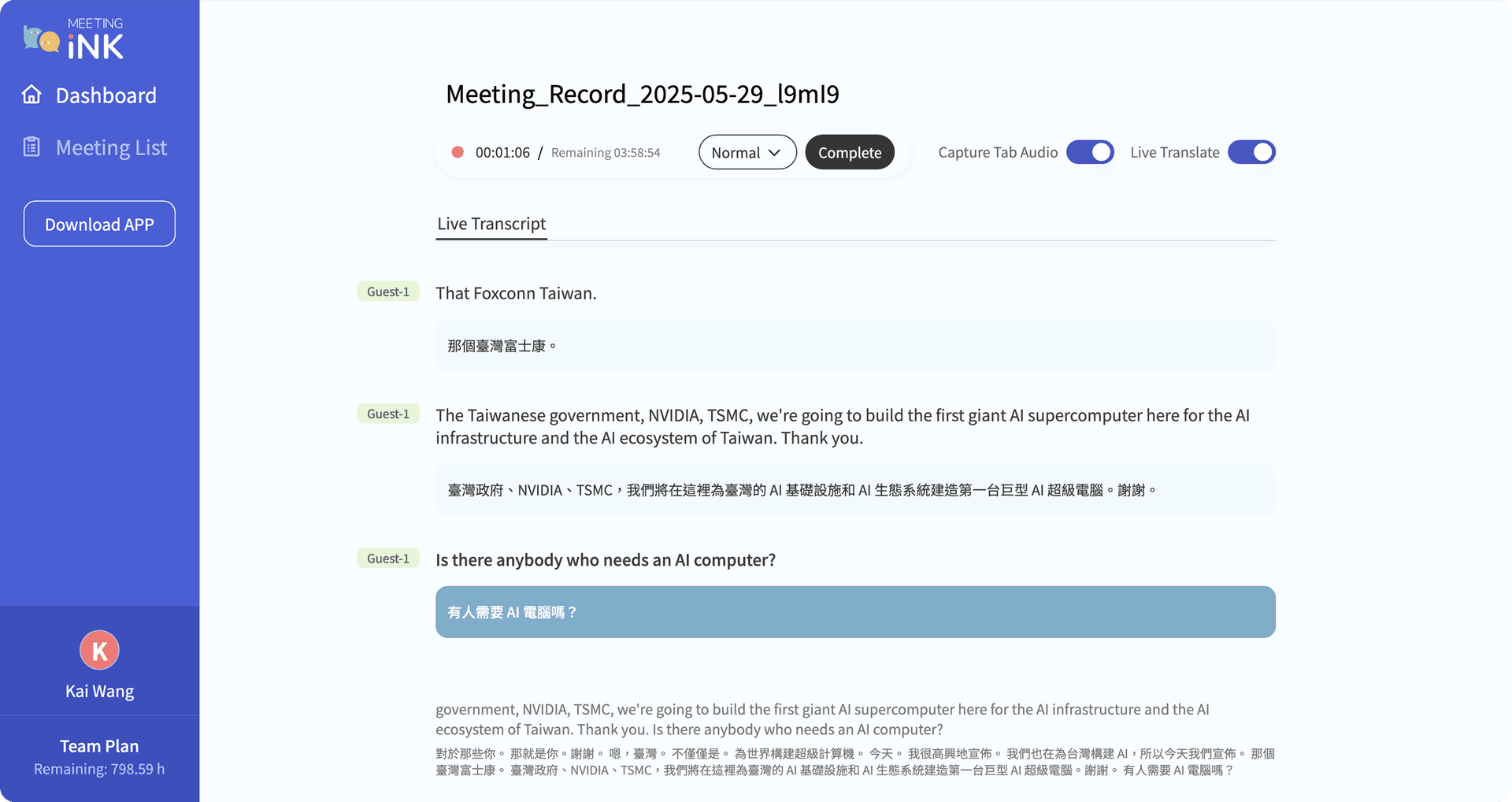
- Standard Mode
Shows both the verbatim transcript and live subtitles at the same time. This mode is ideal for participants who want to read along in real time, review content, check context, or take live notes.
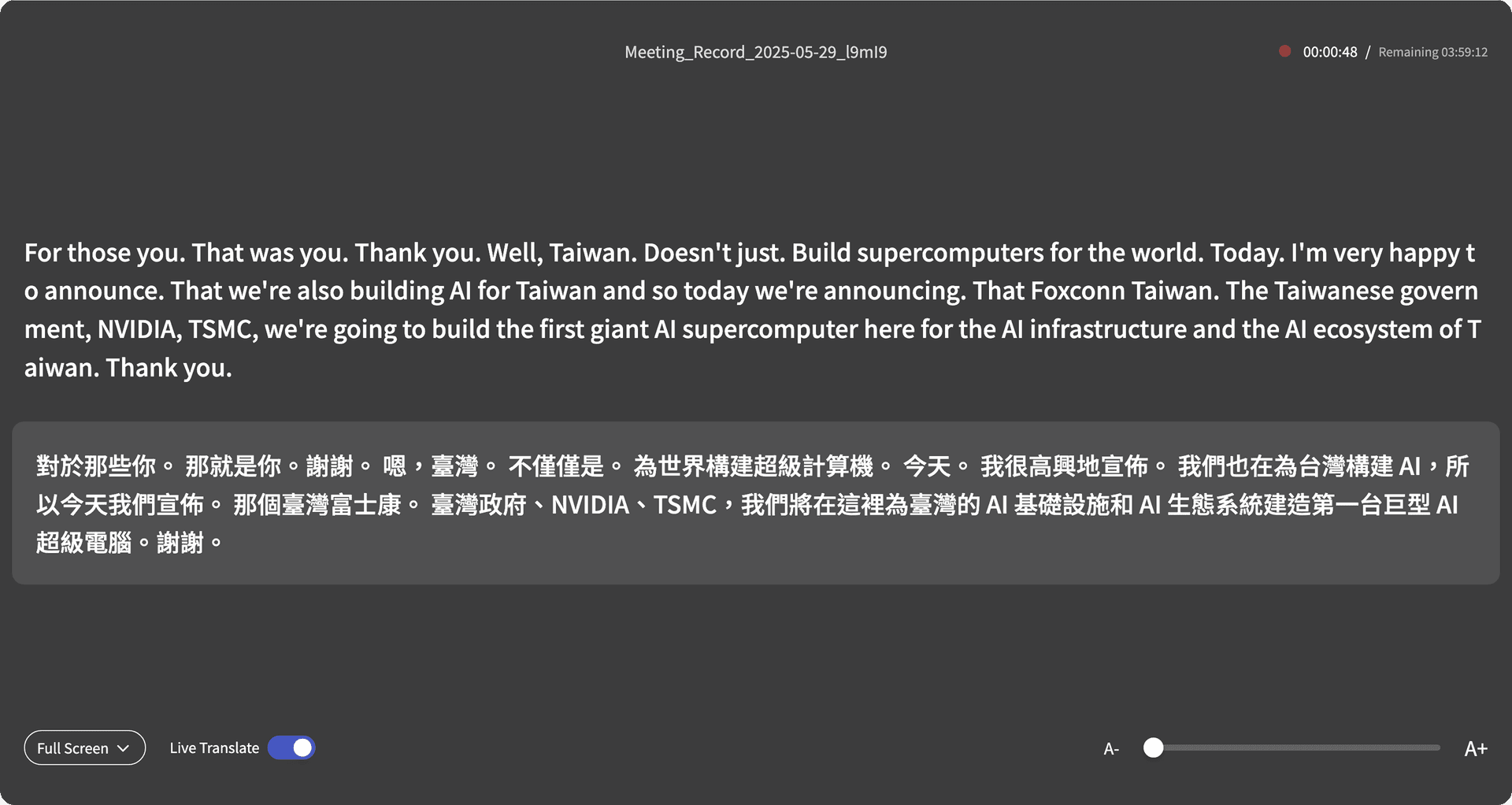
- Full-Screen Mode
Displays large, full-screen subtitles, making it perfect for projecting presentations, online lectures, or any situation where subtitles need to be easily visible from a distance. Font size can be adjusted to ensure all participants can read clearly.
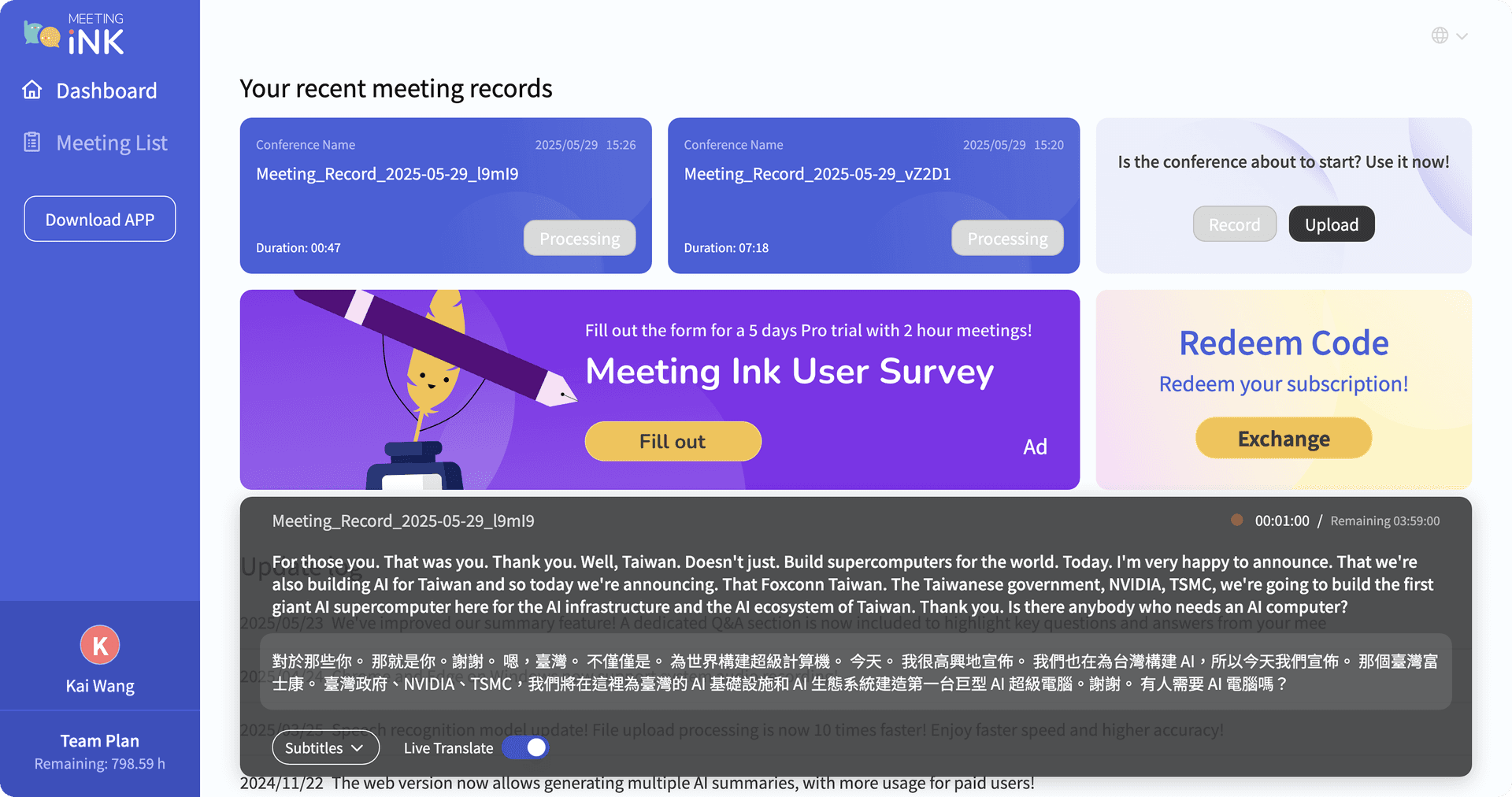
- Subtitle-Only Mode
Displays only the subtitles on screen, without the transcript or additional interface elements. This mode is useful when reviewing past meeting conclusions or presentation slides, reducing visual distractions while providing more flexibility for reading.
Step 3: AI Meeting Notes and Summary Integration
With Meeting Ink, you can do more than just display live subtitles and translations. The platform also allows you to:
- Automatically generate verbatim transcripts
- Produce AI-generated meeting summaries
- Organize content by role or purpose, making follow-up and decision-making easier
These features are valuable for all types of meetings—whether it’s team discussions, consulting presentations, project management sessions, or government meetings. They save time and effort by streamlining the process of capturing, organizing, and reviewing key outcomes.
Clearer, More Efficient Meetings Start Now
Meeting Ink’s live captions, real-time meeting translation, and AI-generated meeting summaries have become essential tools for enterprises, public institutions, and global teams undergoing digital transformation.
By converting spoken content into text, these features reduce misinterpretation, improve comprehension, and enhance cross-language communication. Subtitles for meetings are no longer just an accessory - they are a crucial bridge for capturing knowledge and producing actionable meeting outcomes.
Try Meeting Ink today and experience:
- Real-time subtitles and translation for meetings
- Speaker recognition and segmentation
- AI-generated meeting summaries and organized notes
- Downloadable transcripts and summaries
- Compatibility with web and mobile apps
The real-time subtitle and translation features are available for Pro plan users and above. A limited-time offer lets you try the Pro plan by completing a survey in the member center after registration, giving you a full experience before deciding whether to subscribe.

ทดลองใช้ Meeting Ink ฟรี
สัมผัสทุกฟีเจอร์หลักของ Meeting Ink เพื่อให้การประชุมของคุณมีประสิทธิภาพมากยิ่งขึ้น!
อ่านเพิ่มเติม

Your Face Is the Password Now: Passkey Sign-In Comes to Meeting Ink

Paste a YouTube / Apple Podcast Link to Instantly Transcribe: Take Notes, Write Articles, and Organize Key Points All in One Place
Meeting Ink Desktop Release Note