
Paste a YouTube / Apple Podcast Link to Instantly Transcribe: Take Notes, Write Articles, and Organize Key Points All in One Place
March 12, 2026Turning audio/video or podcast content into text used to require manually extracting audio, transcribing it, then uploading it to a summarization or organizing tool — or even sorting through key points yourself. The fragmented workflow wastes a tremendous amount of time going back and forth. Now, Meeting Ink officially launches the Transcript Link feature: just paste a YouTube link, and the system will automatically extract the audio and generate a transcript, allowing you to take notes, organize key points, and produce summaries right within Meeting Ink. It even works with Apple Podcast episode links — one seamless workflow handles it all.
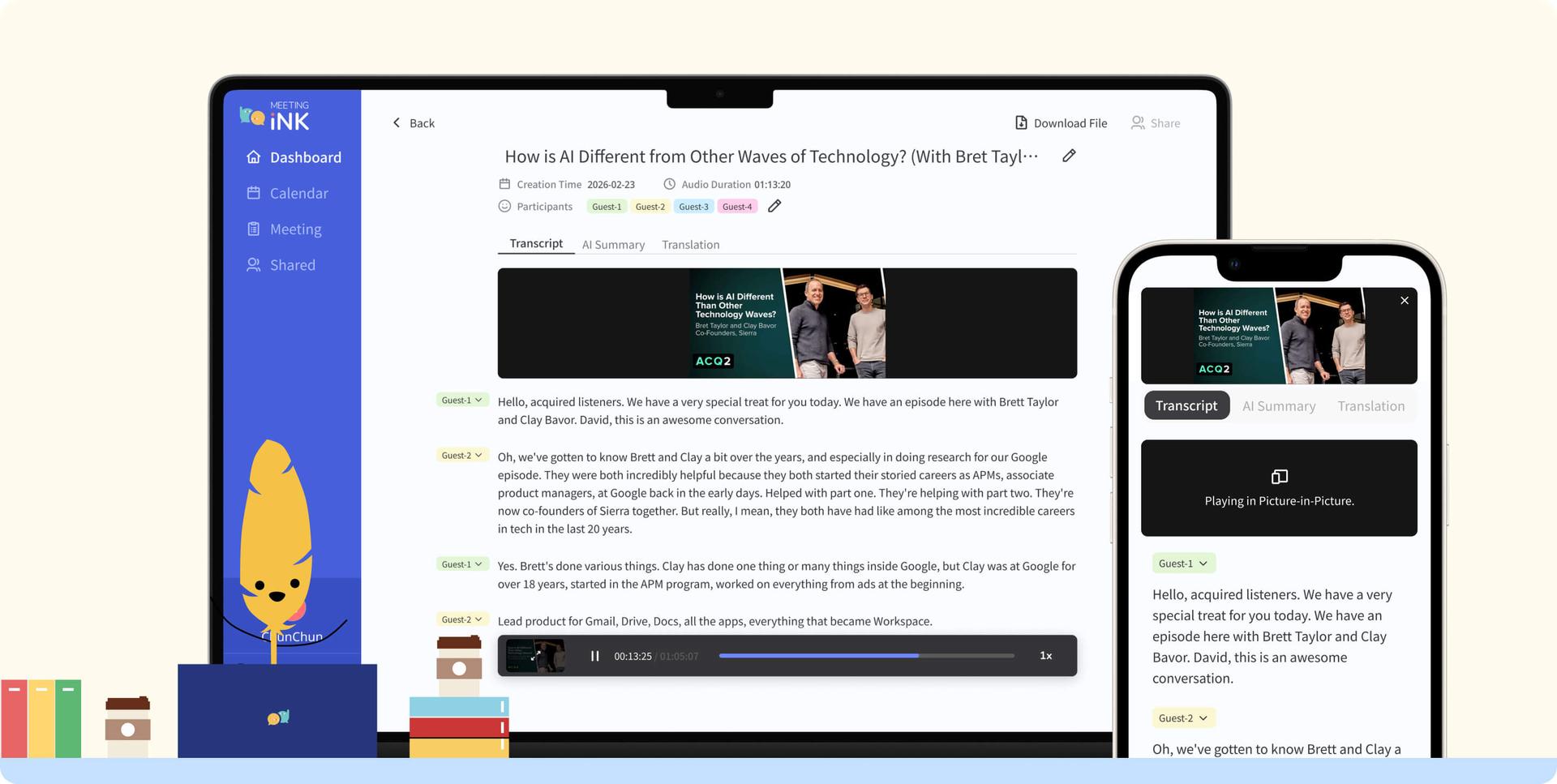
What's New in This Update
- Paste a YouTube / Apple Podcast link to automatically get a transcript: No complicated manual processes needed. Simply paste a YouTube / Apple Podcast link in Meeting Ink's upload interface, and the system will automatically parse the audio and transcribe it, drastically reducing preparation time.
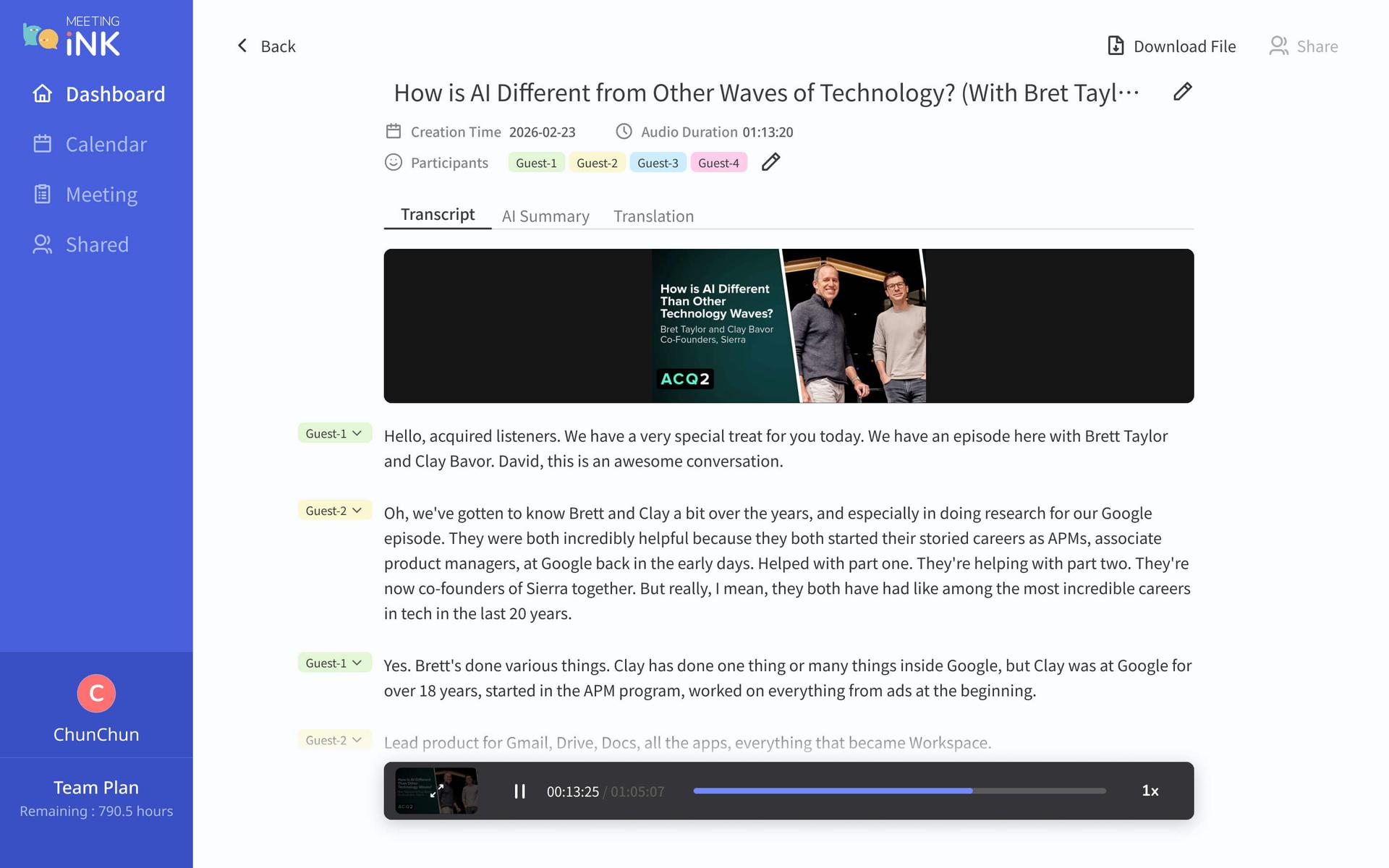
- Embedded video for easy side-by-side viewing: After transcription is complete, the video / podcast is embedded directly in the note page, so you can watch the video while referencing the transcript — significantly boosting learning and organizing efficiency.
- Summaries, translations, and sharing in one smooth flow: once the transcript is generated, all existing features such as AI summaries, multilingual translation, and key point extraction remain fully available. Content can also be easily turned into actionable notes.
- Wide range of use cases: Course learning and reading notes, industry trend research, content creation material gathering, speech or interview highlight extraction, post-meeting supplementary references, and more. *Please note that sharing transcript / summary links is currently not supported.
How to Get Started (Web / App)
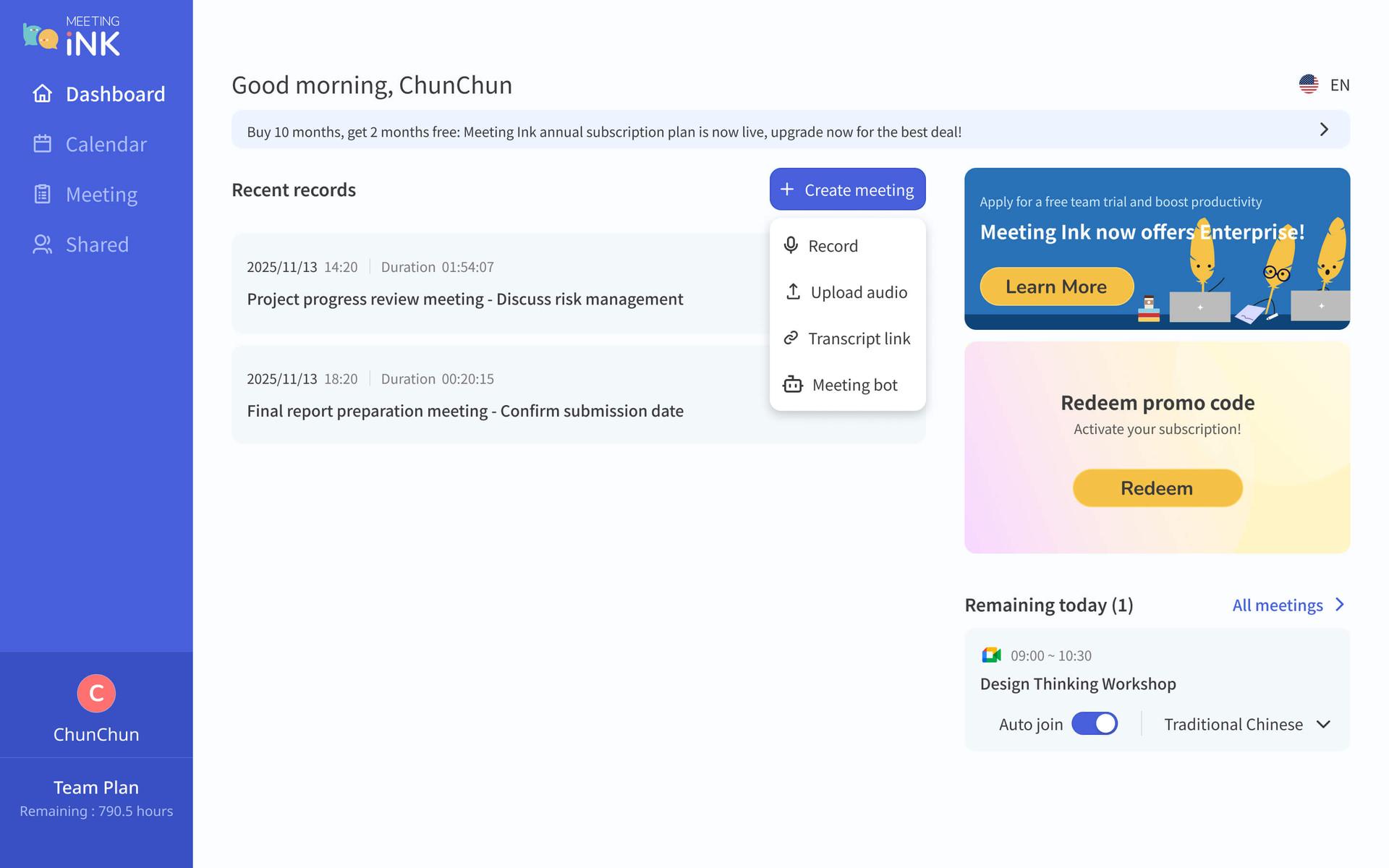
- Open Meeting Ink and click the "Create Meeting" button on the page.
- In the Create Meeting options, select "Transcript Link."
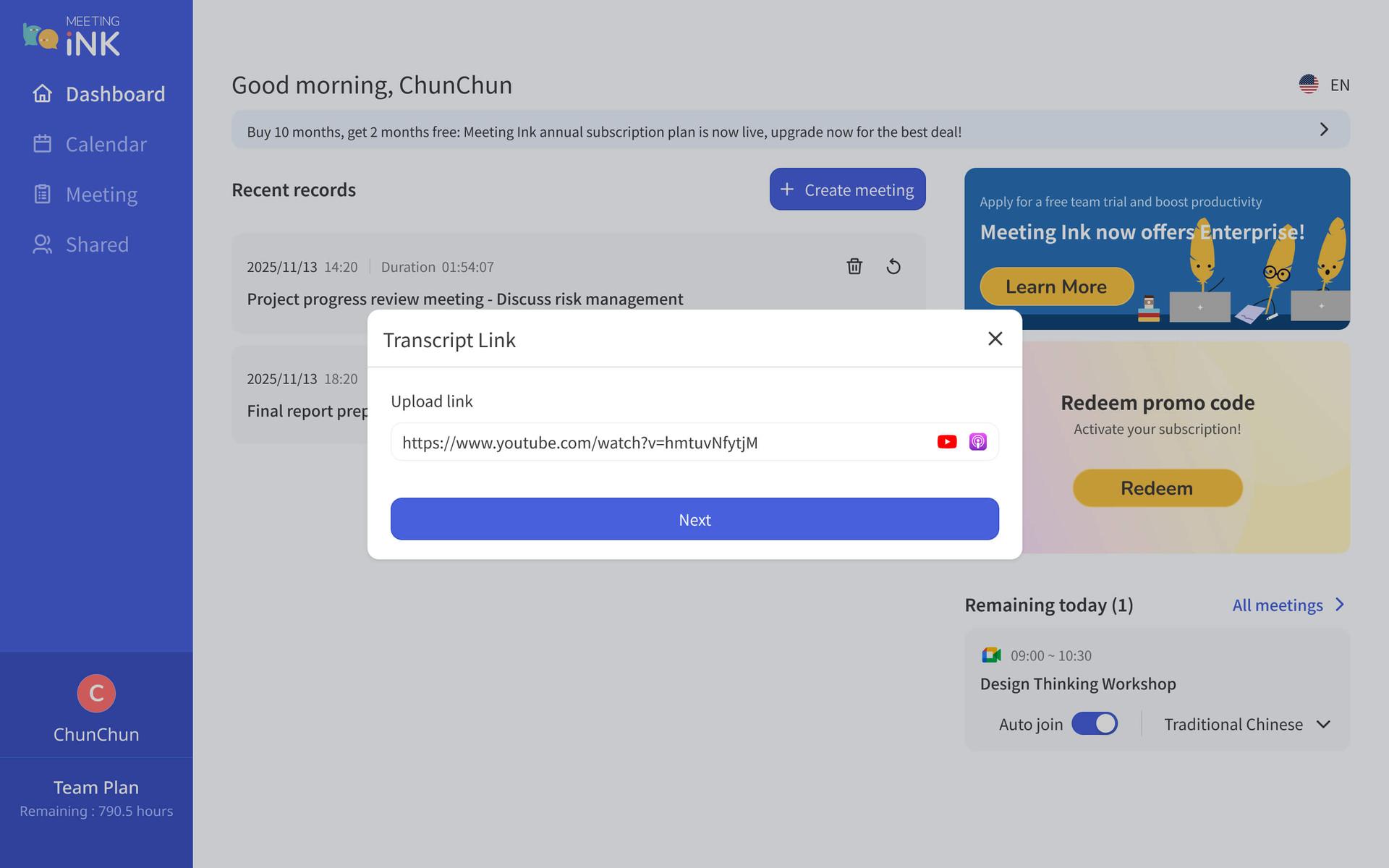
- Paste the YouTube / Apple Podcast link in the URL field and click Confirm.
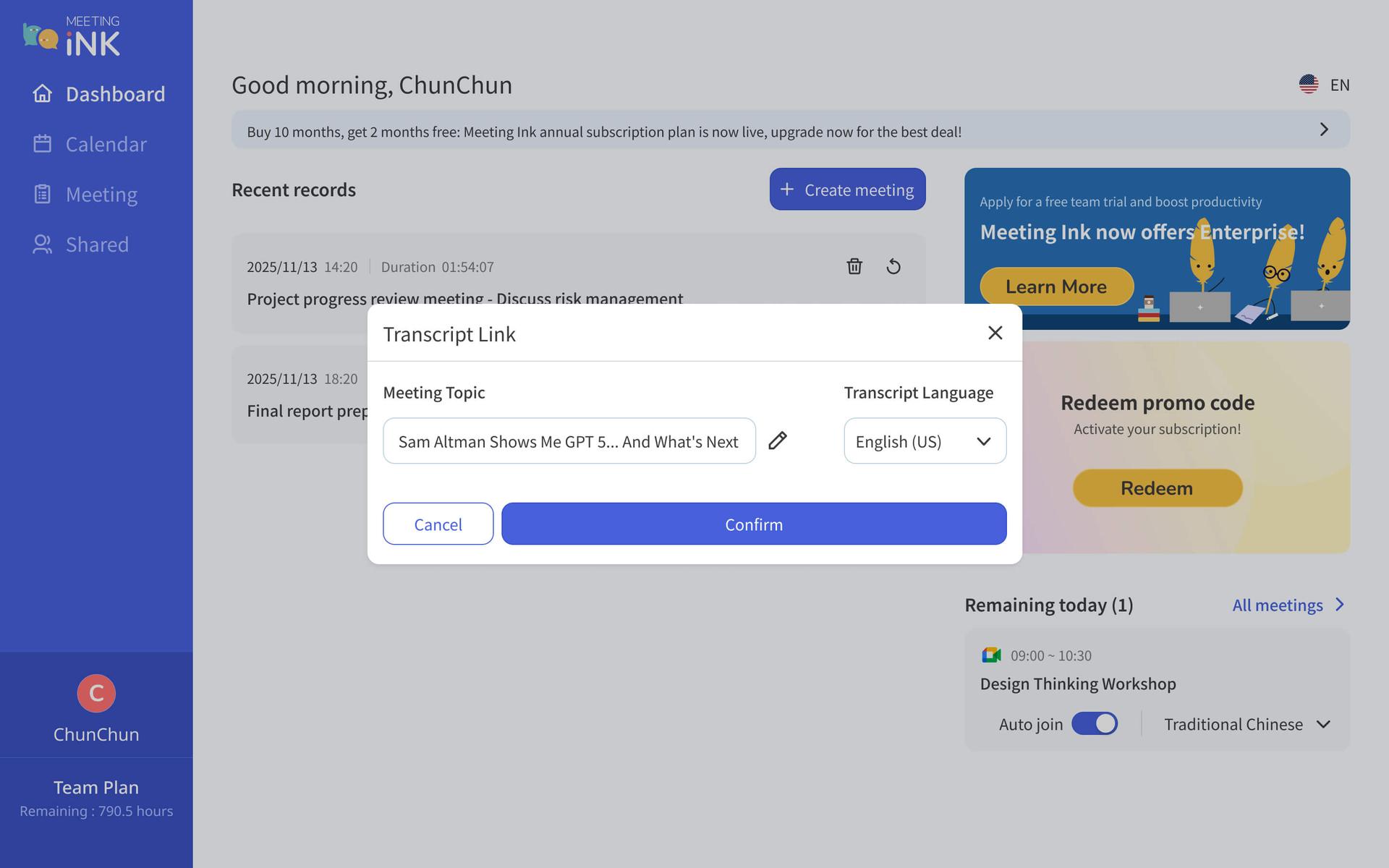
- The system begins parsing the audio (the status bar in the bottom-right corner will display the current status). Once complete, the transcript is automatically generated.
- Click into the note to see the embedded YouTube video or Apple Podcast episode along with the full transcript. You can then generate summaries, translations, and more.
Usage Notes
- Only public YouTube videos and Apple Podcast episodes are currently supported (private videos, region-restricted videos, and videos requiring login are not supported at this time).
- There is a maximum length limit for audio/video (ranging from 30 minutes to 4 hours depending on your plan). For content exceeding the limit, please split it into segments before uploading.
- Audio file downloads are not supported (only transcript downloads are supported), in compliance with the terms of service regarding content usage for videos and podcasts.
How to Get Even More Out of It with Other Features
Summary Templates: Apply summary formats such as "Decisions / Key Points / To-Dos / Owners" to your transcribed YouTube content, quickly transforming video highlights into an actionable note structure.
Reference: "20 New Meeting Summary Templates & Complete Custom Template Guide."
Professional Glossary: If the video contains a large number of specialized terms (e.g., medical, legal, or technical terminology), you can create a terminology dictionary in advance to effectively improve transcript recognition accuracy.
Reference: "Create a Professional Glossary to Improve Meeting Minutes Accuracy."
Paste your YouTube and Apple Podcast episode links into Meeting Ink now — just paste a link and your transcript is automatically ready. Turn every piece of video content into actionable knowledge.
👉 Go to your studio
FAQ
Q1:What link sources does Transcript Link support?
A:We currently support public YouTube videos and Apple Podcast episode links. If there's a platform you'd like us to support, feel free to let us know through "Contact Us"!
Q2:Can I use private videos or videos that require login?
A:Not at this time. Please make sure the video is publicly available and does not require login or payment to view.
Q3:Is there a length limit for audio/video?
A:Yes. The maximum length depends on your subscription plan (Basic: 30 min / Pro: 2 hrs / Pro+: 3 hrs / Team: 4 hrs). For content exceeding the limit, please split it into segments before uploading.
Q4:Can I download the audio or share transcripts/summaries?
A:This feature does not support downloading audio files, nor does it currently support sharing transcript/summary links, in order to comply with the terms of service regarding content usage for videos and podcasts. If you need to keep the content, you can download the transcript for personal use.
Contact Us
We are continuously optimizing Meeting Ink's performance and developing more great features to help you improve meeting efficiency. Stay tuned!
If you have any suggestions or feedback, feel free to contact our support team anytime. We also welcome your template suggestions:
- Email: service@dwave.cc
- Facebook Messenger: Click Here
by Meeting Ink Product Team

Meeting Ink kostenlos testen
Entdecken Sie alle Kernfunktionen von Meeting Ink und machen Sie Ihre Meetings noch effizienter!
Weiterführende Informationen

Your Face Is the Password Now: Passkey Sign-In Comes to Meeting Ink
Meeting Ink Desktop Release Note

Effortless Meeting Notes: 20 New Meeting Summary Templates & Custom Template Guide