
Meeting Ink Now Supports System Audio Recording on Chrome & Edge for Windows!
April 23, 2025🔊 Meeting Ink Now Supports System Audio Recording on Chrome & Edge for Windows!
We’ve heard your requests—and it’s finally here!
Meeting Ink now supports recording system audio when using Chrome or Edge on Windows. That means you can now capture any sound your computer makes, not just what’s playing in the browser tab!
Whether it’s a Zoom meeting, a Microsoft Teams call, a Line voice chat, or even a YouTube video or livestream—we’ve got you covered.
🎯 Real-world use cases
💼 More complete remote meeting recordings
You’re on a Zoom or Google Meet call and someone plays a video or demo during their screen share. Previously, you might’ve missed that audio—not anymore! Now Meeting Ink captures those sounds too.
📚 Record online classes seamlessly
Instructors who share slides and play audio/video clips during class can now have everything recorded clearly—without jumping through hoops.
🎞 Capture multimedia content easily
Need to save a webinar, a podcast, or a livestream? Just play it on your device and hit record. Meeting Ink will capture both the visuals and the sound.
🎙 For testing, customer support, or podcasts
If you’re testing a product with audio output, recording internal voice feedback, or capturing app sounds for user research, this feature makes it all so much easier.
⚙️ How to use it?
Just follow these three simple steps:
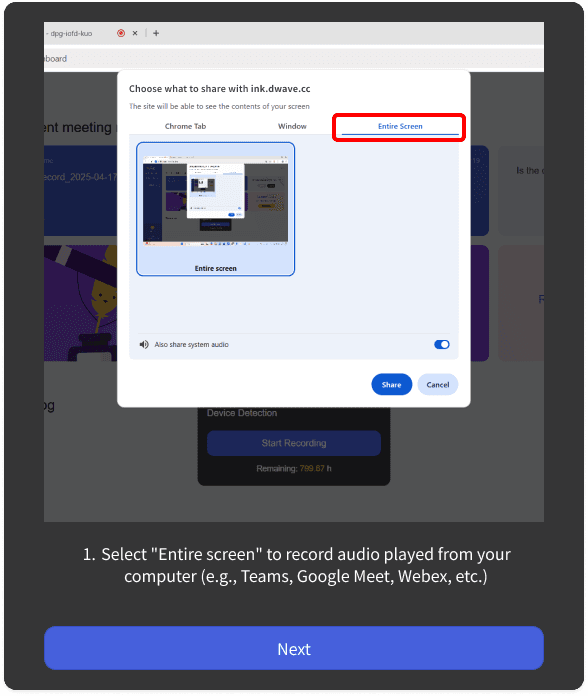
1️⃣ Choose “Entire Screen” when sharing your screen
👉 This unlocks system audio recording capability.
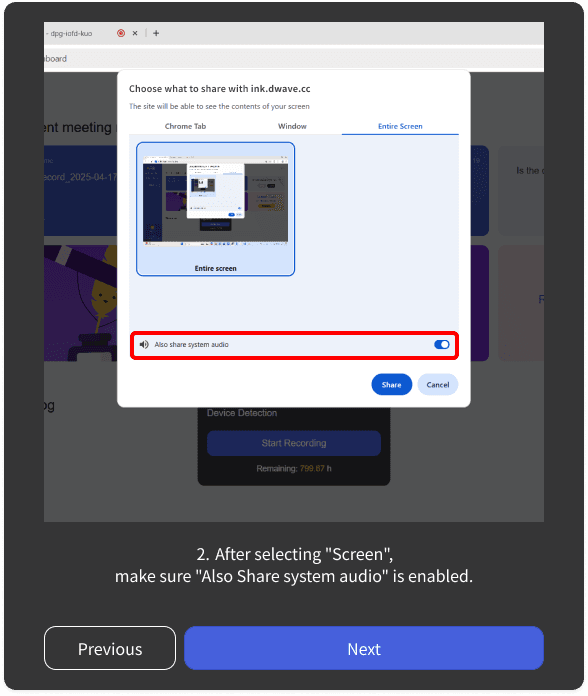
2️⃣ Enable “Share system audio”
👉 Make sure the toggle is on!
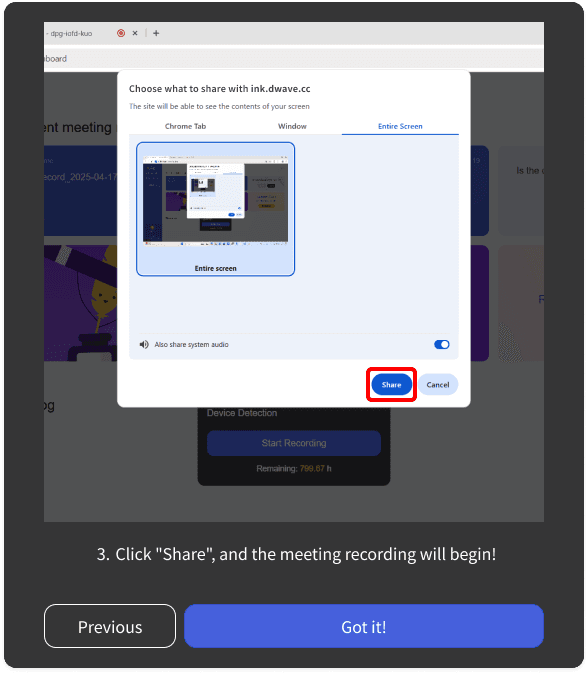
3️⃣ Click “Share” to begin recording
👉 Meeting Ink will now capture all sounds coming from your device.
✅ No extensions. No extra setup. Just press record.
This update is available now on Windows via Chrome and Edge.
Whether you’re capturing an important meeting, a training session, or a live broadcast—you’ll never miss a sound again.
Try it out today and make every recording complete with Meeting Ink!

Prueba gratuita de Meeting Ink
Prueba todas las funciones principales de Meeting Ink y haz tus reuniones más eficientes.
Lectura adicional

Your Face Is the Password Now: Passkey Sign-In Comes to Meeting Ink

Paste a YouTube / Apple Podcast Link to Instantly Transcribe: Take Notes, Write Articles, and Organize Key Points All in One Place
Meeting Ink Desktop Release Note