Meeting Ink Now Supports Browser Tab Audio Recording
June 17, 2024We are excited to announce that Meeting Ink has added a brand-new feature: browser tab audio recording! This feature allows you to record audio from your browser tab as well as your microphone, making it perfect for online meeting recordings. Whether you're using Google Meet, Zoom, Microsoft Teams, or any other browser-based meeting service, you can easily capture the entire meeting content.
Key Features:
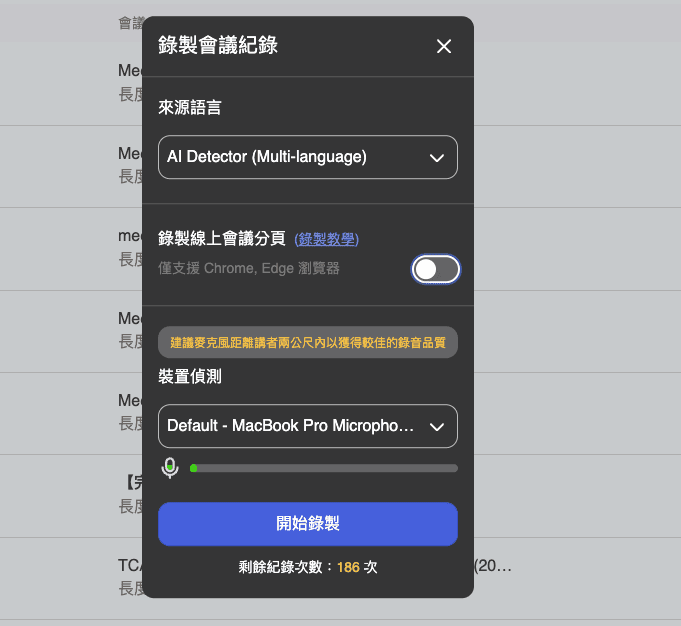
- Multilingual AI Detection: With multilingual AI detection, meeting notes are more accurate than ever.
- Browser Tab Audio Recording: Supports Chrome and Edge browsers, enabling you to record audio from your browser tabs, ensuring every detail of the meeting is captured.
- Record Even if Not the Host: Unlike other meeting software, you can record meetings even if you're not the host.
- High-Quality Audio: For the best audio quality, it's recommended to keep the microphone within two meters of the speaker.
- Better Recognition: Advanced voice recognition technology provides higher accuracy and better audio quality.
How to Use:
- Select Source Language: Before the meeting starts, choose "AI Detector (Multi-language)" to enable multilingual detection.
- Enable Browser Tab Audio Recording: Turn on the "Record browser tab audio" option (supports only Chrome and Edge browsers) and share the tab audio in the browser.
- Start Recording: After device detection is confirmed, click the "Start Recording" button to begin recording the meeting.
Use Cases and Scenarios:
Scenario 1: International Team Meetings
In international team meetings, members come from different countries and speak different languages. Meeting Ink's multilingual AI detection feature allows you to easily record and transcribe meeting content without worrying about language barriers affecting the accuracy of the meeting notes. Even if you are not the meeting host, you can record the entire meeting process and generate high-quality audio files.
Scenario 2: Online Course Recording
For online courses, you may want to record the lecturer's content for later review. With Meeting Ink, you can record both the instructional videos and lectures presented in the browser, saving high-quality audio files for future study.
Scenario 3: Business Meeting Records
As a sales representative, you frequently conduct online meetings with clients. Meeting Ink allows you to record all meeting audio, even if you are not the host. After recording, you can quickly extract the meeting highlights using the AI summary feature, saving a lot of time.
AI Summary Optimization:
Currently, Meeting Ink already has an AI summary feature. We are optimizing prompts and algorithms to provide more detailed and practical meeting summaries. This feature will automatically generate meeting summaries, allowing you to quickly grasp the key points of the meeting.
Future Outlook:
We plan to introduce more feature updates in the future, including:
- Further Optimize AI Summary: Improve the accuracy and practicality of summaries.
- Personalized Summary Formats: Offer various summary format options to meet different user needs.
We invite all users to try this new feature and use it frequently to enhance your meeting recording experience. Thank you for your support!
Download and experience the new features of Meeting Ink now, and make sure every online meeting is perfectly recorded!

Prueba gratuita de Meeting Ink
Prueba todas las funciones principales de Meeting Ink y haz tus reuniones más eficientes.
Lectura adicional

Your Face Is the Password Now: Passkey Sign-In Comes to Meeting Ink

Paste a YouTube / Apple Podcast Link to Instantly Transcribe: Take Notes, Write Articles, and Organize Key Points All in One Place
Meeting Ink Desktop Release Note